Description
mSATA is a miniaturized SATA interface, commonly used in laptops and embedded devices. The TaishanPi-3M development board integrates a MINI-PCIe interface. MINI-PCIe and mSATA have physically compatible interfaces, making it convenient to connect mSATA solid-state drives to expand storage capacity and improve data transmission speed.
Connecting mSATA Solid State Drive
Connect the mSATA solid-state drive to the development board's MINI-PCIe interface.
Downloading Corresponding Image
Use Network Disk🚀 to download the provided .img image file in the System Image/Ubuntu24/ directory.
The image used in this document is: TaishanPi-3M-RK3576_Ubuntu24-Xubuntu_AP6256-mSATA.img
Look for the image file with
msatain its name.
Flashing Image to Development Board
Reference Finished Image Flashing to flash the downloaded image to the development board.
Using mSATA Solid State Drive
Note: The password for user
lckfbislckfb
There are two ways to use the mSATA solid-state drive:
1⃣ You can see the newly added New Volume disk icon on the desktop. Double-click to mount it, enter the lckfb password to access the files.
After double-clicking, a password input window will pop up. Enter the
lckfbpassword to authorize mounting and then you can access it.The default mount location is
/media/lckfb/<device_name>. You can also access the files through the file manager by navigating to this directory.
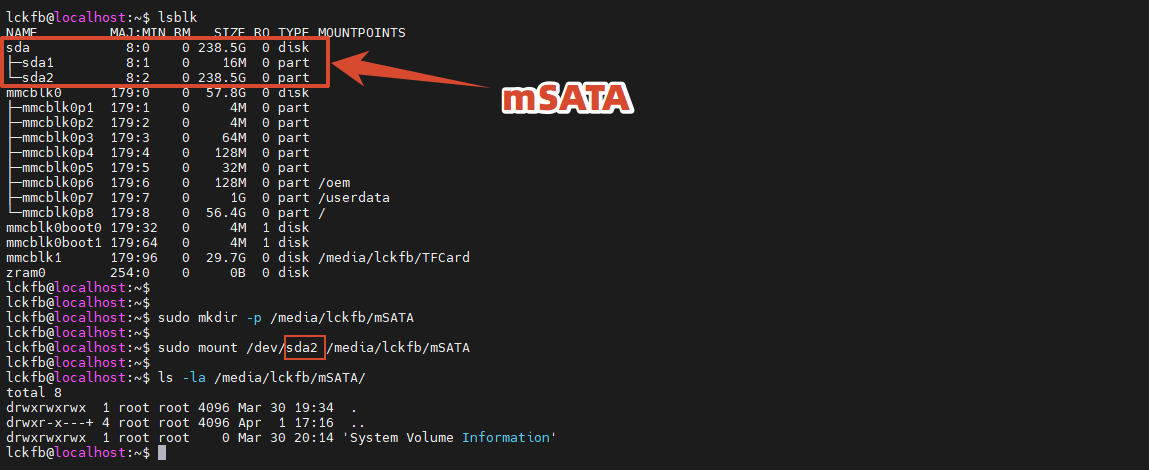
2⃣ You can also open the terminal and mount it manually.
Check if the TF card is recognized by looking for a device with similar capacity:
lsblkThen create a mount directory and mount:
Note: Mount the actual storage partition of the solid-state drive, such as
/dev/sda2, not the entire device/dev/sda.
sudo mkdir -p /media/lckfb/mSATA
sudo mount /dev/sda2 /media/lckfb/mSATANavigate to the mount directory to access the files on the mSATA drive.